Unspam.email Review: Accessibility Checker and Spam Testing
Pros
- Unique accessibility scoring that no other deliverability tool provides
- Heatmap preview shows where recipients are likely to look first in your email
- Multi-filter content testing catches spam triggers and problematic patterns before sending
- Most affordable paid plans in the deliverability category — $9/mo entry point
- Free plan with 5 tests/month is genuinely useful for monthly pre-send checks
Cons
- Limited scope — accessibility and spam testing alone do not constitute a deliverability solution
- No inbox placement testing across providers like GlockApps or Everest offer
- Heatmap is predictive (algorithm-based), not based on real eye-tracking data
- Small company with limited track record compared to established deliverability tools
- No DMARC analytics, blacklist monitoring, or list verification capabilities
What is Unspam.email?
Unspam.email is a lightweight email testing tool that combines spam filter analysis with accessibility scoring and predictive heatmap previews. While the deliverability industry has focused heavily on inbox placement testing, sender reputation monitoring, and list verification, Unspam has carved out a niche by addressing two areas that most competitors ignore: whether your email is accessible to people with disabilities, and whether your visual design directs attention to the right elements.
The premise is simple. You send your email to an Unspam test address (or paste the HTML into the tool), and it runs three analyses: a spam filter check against multiple content-based filtering engines, an accessibility audit that evaluates your email for screen reader compatibility, contrast ratios, alt text, and other WCAG-related criteria, and a predictive heatmap that visualizes where recipients are likely to focus when viewing your email.
This is a young company with a focused product — not a comprehensive deliverability platform. That focus is both its strength and its limitation. We have tested Unspam alongside our broader deliverability toolkit to evaluate where it adds value and where it falls short.
Key Features We Tested
Spam Filter Testing
Unspam runs your email through multiple content-based spam filters, returning a score and a detailed breakdown of which rules triggered. The analysis identifies problematic keywords, HTML issues, missing headers, and structural problems that may cause content-based filters to flag your email.
The spam testing is functional and catches the usual suspects: spammy subject lines, excessive capitalization, suspicious link patterns, image-to-text ratio problems, and missing unsubscribe headers. The results are presented clearly with explanations of each triggered rule and suggestions for improvement.
However, content-based spam filtering represents only a fraction of modern deliverability. Gmail, Microsoft, and Yahoo primarily filter email based on sender reputation, engagement history, and machine learning models that consider far more than content keywords. A clean content filter score does not guarantee inbox delivery, and a flagged score does not necessarily mean spam folder placement. Content-based filters are the entry-level check — necessary but not sufficient.
Our free Spam Word Checker provides similar content analysis for email copy. For a more comprehensive pre-send check, our free Deliverability Tester runs a 12-point analysis covering content scoring, authentication, blacklists, and inbox placement — without requiring an account. Unspam’s advantage over both is testing against the full filter rule set (not just word matching) and providing an overall spam score. For a quick pre-send content check, any of these work. For comprehensive deliverability testing, our /delivery-check goes further than content analysis alone.
Accessibility Scoring
This is where Unspam provides genuinely unique value. The accessibility audit evaluates your email against common accessibility criteria:
- Color contrast: Checks whether text and background combinations meet WCAG contrast ratio guidelines, ensuring readability for people with low vision or color blindness
- Alt text: Verifies that images include descriptive alt text for screen reader users
- Semantic structure: Checks for proper heading hierarchy and content structure that screen readers can navigate
- Font size: Flags text that may be too small for comfortable reading
- Link visibility: Checks whether links are visually distinguishable from surrounding text
- Table structure: Evaluates whether tables used for layout include proper ARIA attributes
The accessibility score is presented as a percentage with specific recommendations for improvement. In our testing, the scoring was reasonable — emails with known accessibility issues scored lower, and improvements in contrast, alt text, and structure produced higher scores.
No other deliverability tool provides this kind of accessibility analysis for email. Litmus and Email on Acid test rendering across email clients but do not audit accessibility. GlockApps and Everest test inbox placement but have no accessibility component. For organizations that take accessibility seriously — and increasingly, legal requirements make this a business necessity rather than a nice-to-have — Unspam fills a genuine gap.
The importance of email accessibility is growing. Approximately 2.2 billion people globally have some form of visual impairment. Legal frameworks including the ADA (US), EAA (EU), and AODA (Canada) increasingly extend accessibility requirements to digital communications including email. An accessibility audit on every campaign is becoming standard practice for organizations that want to comply with these requirements and serve their entire audience.
Heatmap Preview
The heatmap feature generates a visual overlay on your email showing predicted attention patterns — where recipients are most likely to look first, where their gaze will travel, and which elements will attract the most focus. The heatmap uses colors (red for high attention, yellow for moderate, green for low, blue for minimal) to visualize the predicted attention distribution.
The heatmap is generated algorithmically, not from real eye-tracking data. It uses principles of visual design and attention research — large images attract more attention than small text, high-contrast elements stand out against uniform backgrounds, faces and eyes draw gaze, buttons with strong color contrast attract clicks — to predict viewing patterns.
In practice, the heatmap is useful as a design sanity check. If your call-to-action button is in a blue (low attention) zone while a decorative image dominates the red (high attention) zone, the design may not be serving your goals. The heatmap highlights these design imbalances visually, making it easy to spot and fix them.
The limitation is accuracy. Predictive heatmaps based on algorithms are directionally useful but not precise. Real eye-tracking studies consistently show that individual behavior varies significantly based on context, device, familiarity with the sender, and personal reading patterns. Treat the heatmap as a design tool, not behavioral research.
API Access
Paid plans include API access for integrating Unspam testing into email development workflows. You can submit email HTML programmatically and receive spam scores, accessibility scores, and heatmap data via API response. This enables automated testing in CI/CD pipelines or email template management systems.
The API is straightforward — send HTML, get scores — and documentation is adequate for integration. For teams building automated email quality checks into their development process, the API turns Unspam from an ad-hoc testing tool into a continuous quality gate.
Pricing Breakdown
Unspam.email offers simple, affordable pricing:
- Free: 5 email tests per month, spam analysis, accessibility score, heatmap preview. No account required for single tests; account needed for history and additional tests.
- Starter ($9/mo): 100 tests per month, full spam analysis, accessibility scoring, heatmap, API access, email support
- Growth ($29/mo): 500 tests per month, priority analysis, advanced API access, team features, priority support
- Enterprise ($79/mo): 2,000 tests per month, custom integrations, dedicated support, SLA
This is the most affordable pricing in the deliverability tools category. For context, GlockApps starts at $79/month (Unspam’s Enterprise price), and MxToolbox’s paid monitoring starts at $129/month. Unspam’s entry at $9/month makes it accessible to virtually any email sender.
The free plan is genuinely useful. Five tests per month is enough for a monthly pre-send check on your primary campaign template. For teams sending weekly campaigns, the Starter plan at $9/month provides ample test volume.
The question is not whether Unspam is affordable — it clearly is — but whether its specific capabilities are the ones you need most. If your email program’s primary challenge is inbox placement, sender reputation, or list quality, other tools should come first. Unspam is best positioned as a complement to a core deliverability toolkit, not a replacement for one.
Who It’s Best For
Accessibility-focused teams get the most unique value from Unspam. If your organization is committed to accessible email communication — whether for compliance, inclusion, or both — Unspam’s accessibility scoring is the only pre-send check specifically designed for this purpose. The automated accessibility audit catches issues that manual review often misses.
Email developers and designers building templates can use Unspam as a quality assurance tool. Running templates through accessibility and spam checks before deployment catches problems early. The heatmap preview adds a design review layer that helps optimize visual hierarchy.
Small senders on tight budgets who want some deliverability insight without major investment can start with Unspam’s free plan. Five monthly spam and accessibility checks provide basic pre-send validation that is better than no testing at all. Pair it with our free Deliverability Tester and free tool suite — SPF, DMARC, blacklist, and inbox placement checks — for a comprehensive zero-cost foundation before investing in paid tools.
Agencies managing multiple client email programs can use the Growth or Enterprise plans to run template audits efficiently. The accessibility scoring in particular can be packaged as part of an email quality service offering.
Limitations
The fundamental limitation is scope. Unspam tests email content and accessibility but does not test the factors that most influence modern deliverability: sender reputation, engagement history, IP reputation, and provider-specific filtering algorithms. A perfect Unspam score does not predict inbox delivery. The tool tells you whether your email content and design meet quality standards — it does not tell you whether Gmail will deliver it.
The heatmap feature, while interesting, is a predictive model rather than empirical data. Treating it as a definitive guide to recipient behavior would be a mistake. It is useful for catching obvious design problems but should not drive major strategic decisions about email layout.
The company is relatively small and young compared to established deliverability players like Validity, GlockApps, or MxToolbox. This means less data history, a smaller support team, and potentially more volatility in product development and availability. The product is solid today, but the long-term track record is unproven.
Integration ecosystem is limited. While API access enables custom integrations, there are no native integrations with major ESPs, CRMs, or marketing platforms. You cannot, for example, automatically test every campaign in Mailchimp through Unspam before it sends. Integration requires development work.
Finally, the spam testing relies on content-based filter rules, which represent one layer of filtering among many. Major mailbox providers use proprietary systems that share some overlap with content rules but differ significantly in their scoring and decision-making. A clean content filter score is encouraging but not conclusive about real-world inbox placement.
Bottom Line
Unspam.email occupies a unique and underserved niche in the email tooling landscape. The accessibility scoring is genuinely valuable and available nowhere else in the deliverability category. The spam filter testing provides useful pre-send content checks, and the heatmap preview adds a design review layer that catches visual hierarchy problems.
The tool is affordable, easy to use, and provides value as part of a broader email quality workflow. The low rating reflects not a quality problem but a scope limitation — Unspam does its specific things well but cannot serve as a primary deliverability tool. Start with our free Deliverability Tester and tool suite to establish your baseline — authentication, blacklists, inbox placement, and content scoring, all free with no account required. Once you have confirmed your core deliverability foundation is solid, add Unspam when accessibility compliance and content quality become priorities. At $9/month, the barrier to adding it is negligible.
Our Verdict
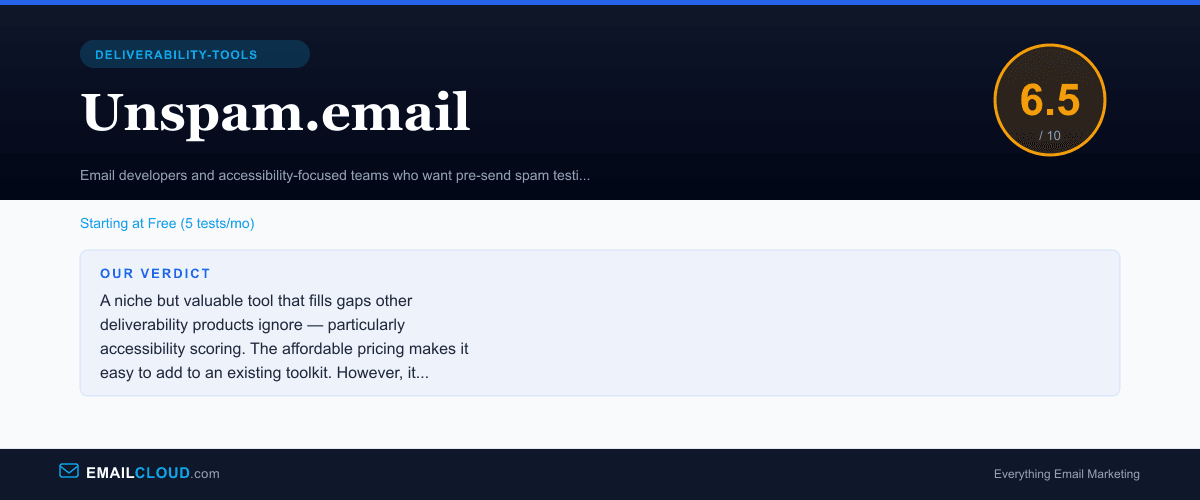
A niche but valuable tool that fills gaps other deliverability products ignore — particularly accessibility scoring. The affordable pricing makes it easy to add to an existing toolkit. However, it lacks the core deliverability features (inbox placement testing, reputation monitoring, list verification) that should be your first priority. Best used as a complement to stronger deliverability tools, not a replacement.
Review Summary
Share this visual summary. Right-click to save.
Frequently Asked Questions
What does Unspam.email do?
Unspam.email provides three core functions: email accessibility scoring (checking whether your email is usable for people with visual impairments, screen readers, and other accessibility needs), spam filter testing (running your email through multiple content-based spam filters to check for triggers), and heatmap preview (showing where recipients are most likely to focus their attention when viewing your email). The combination is unique — no other tool in the category provides accessibility scoring alongside spam testing.
Is Unspam.email a replacement for inbox placement testing?
No. Unspam.email tests your email content against spam filters and checks accessibility, but it does not test actual inbox placement across providers like Gmail, Yahoo, and Outlook. A clean spam filter score does not guarantee inbox delivery — major providers use engagement-based filtering, sender reputation, and proprietary algorithms that go far beyond content-based spam rules. For inbox placement testing, use our free [Deliverability Tester](/delivery-check/), which runs a 12-point analysis covering authentication, blacklists, spam scoring, and inbox placement — no signup required. Unspam.email is best used as a pre-send content and accessibility check alongside a comprehensive deliverability tester.
How accurate is the Unspam.email heatmap?
The heatmap is generated by a predictive algorithm, not real eye-tracking data from actual email recipients. It uses principles of visual hierarchy — image placement, text size, contrast, button placement, white space — to predict where readers are most likely to focus their attention. The predictions are directionally useful for identifying whether your key content and call-to-action buttons are positioned in high-attention areas. However, they should not be treated as precise behavioral data. For actual eye-tracking research on email engagement, dedicated UX research tools provide more reliable data.
Is Unspam.email worth paying for?
At $9/month for the Starter plan, the financial commitment is minimal. If you send regular email campaigns and want a pre-send accessibility and spam check, $9/month is easy to justify. The question is whether you need these specific capabilities. Most email marketers should start by running our free [Deliverability Tester](/delivery-check/) and [free tool suite](/tools/) — covering SPF, DMARC, blacklists, spam scoring, and inbox placement — before adding paid tools to the mix. If accessibility compliance is a priority — as it should be — Unspam fills a gap that other tools ignore. If you are choosing a single deliverability tool, it would not be this one. But at $9/month as an add-on to a solid free foundation, it is easy to justify for teams that care about accessible email design.
Stay ahead of the inbox
Weekly tips on deliverability, automation, and growing your list. No spam, ever.
No spam. Unsubscribe any time. We respect your inbox.